Remote work isn’t going anywhere — and in 2026, your home office setup is more important than ever. Whether you’re a full-time remote worker, a hybrid professional, or someone who just works better from a personal desk, the right tools make a measurable difference in your focus, comfort, and output. We’ve scoured Amazon’s best sellers, tested trending gear, and consulted ergonomics research to bring you the definitive Best WFH & Desk Setup Tools upgrade.
Category 1 – Standing Desks
Motorized sit-stand desks are the single most impactful ergonomic investment you can make in 2026. Alternating between sitting and standing throughout the day reduces fatigue, supports better posture, and keeps focus sharper during long stretches of deep work.
1. Flexispot E7 Pro Standing Desk
The Flexispot E7 Pro is the clear value winner for 2026. With a dual-motor system, 355-lb capacity, 15-year warranty, and integrated USB-A charging port, it delivers commercial-grade performance at a consumer price point. Height presets, a digital display, and whisper-quiet motor movement make daily transitions effortless.

Pros
- Dual-motor, ultra-stable
- 355 lb weight capacity
- Built-in USB charging
- 15-year frame warranty
- 4 programmable presets
Cons
- Assembly takes ~45 min
- Desktop sold separately
2. ErGear Electric Standing Desk (48×24″)
For smaller rooms or first-time standing desk buyers, the ErGear 48×24″ is a well-reviewed compact option that won’t break the bank. Single motor, basic height memory, and a sturdy frame make it a solid starter setup. Thousands of Amazon verified buyers praise its easy assembly and surprisingly stable surface.

Pros
- Budget-friendly price
- Compact footprint
- Easy 30-min assembly
- Height memory buttons
Cons
- Single motor (less stable)
- Lower weight limit (~176 lb)
- No USB charging port
Category 2 – Monitors
In 2026, 4K OLED monitors are becoming mainstream and ultrawide displays are a top-trending search for home office setups. The right monitor can drastically reduce eye strain and massively improve multitasking.
3. LG 27″ 4K UHD IPS Monitor (27UP850N)
The LG 27UP850N hits the sweet spot between price and performance for WFH professionals. With a 4K IPS panel, USB-C 96W charging, DisplayPort 1.4, and a built-in KVM switch, this monitor is a powerhouse for productivity. The factory-calibrated color accuracy makes it equally great for creative work.

Pros
- 4K IPS, stunning clarity
- USB-C 96W pass-through
- Built-in KVM switch
- Factory color calibrated
- Height/tilt/swivel adjustable
Cons
- 60Hz (not for gaming)
- Speakers are mediocre
4. Samsung 34″ Ultrawide Curved Monitor (S34A650)
Ultrawide monitors are dominating WFH wishlists in 2026. The Samsung 34″ 3440×1440 QHD curved display gives you the screen real estate of two monitors without the ugly gap in the middle. Perfect for spreadsheet warriors, coders, and anyone who lives in multiple open windows.

Pros
- Replaces dual-monitor setup
- 100Hz refresh rate
- USB-C + USB hub built in
- Elegant curved panel
Cons
- Needs wide desk space
- Premium price point
Category 3 – Ergonomic Chairs
Back pain is one of the top complaints of remote workers. A proper ergonomic chair isn’t a luxury — it’s a health investment. These are the top-rated options on Amazon in 2026 across every budget.
5. Herman Miller Aeron
The Herman Miller Aeron remains the gold standard for home office seating in 2026. Its PostureFit SL system molds to your spine for all-day support, the mesh breathes in summer heat, and it’s engineered to last decades. The remanufactured option on Amazon brings the price down dramatically while still delivering the full Aeron experience.

Pros
- Best-in-class lumbar support
- Breathable mesh, no heat buildup
- Highly adjustable (size A/B/C)
- Built to last 10–15+ years
Cons
- Expensive, even refurbed
- Firm seat — not for everyone
6. Colamy Kirin Ergonomic Chair
The Colamy Kirin is a breakout star of the 2026 Amazon ergonomic chair reviews. At $149–$179, it delivers build quality and adjustment depth that rivals chairs at $400+. The 4-way adjustable lumbar, excellent headrest, and breathable mesh back make it the top pick for budget-conscious remote workers who don’t want to compromise on comfort.

Pros
- 4-way lumbar support
- Breathable mesh
- Solid adjustable headrest
- Punches way above price
Cons
- No seat depth adjustment
- Arm pads slightly firm
Category 4 – Monitor Arms
A monitor arm frees up desk space, enables perfect eye-level positioning, and is one of the highest-ROI desk accessories in 2026. Cable management trays and monitor arms are consistently ranked among the most useful WFH upgrades.
7. Ergotron LX Desk Monitor Arm
The Ergotron LX is the arm every WFH community points to when asked for a recommendation. Its patented CF (constant force) technology means smooth, one-touch repositioning that holds any position without drift. The integrated cable channel keeps wires hidden, and it accommodates monitors up to 34″ and 34 lbs. Available in single, dual, and tall-pole configurations.

Pros
- Smooth, drift-free movement
- Clean cable management
- Very wide adjustment range
- 10-year warranty
Cons
- More expensive than clones
- Setup can be fiddly
Category 5 – Webcams
In an era of endless video calls, a quality webcam matters more than most people realize. Laptop cameras are genuinely bad — a dedicated webcam instantly makes you look more professional and credible on screen.
8. Logitech Brio 305 / Brio 500
The Logitech Brio line dominates Amazon’s webcam best sellers. The Brio 305 offers Full HD 1080p with a sharp autofocus lens and excellent low-light performance at an accessible price. Step up to the Brio 500 for 4K capability, a show-mode view, and superior HDR — a trusted setup by millions of remote workers globally.

Pros
- Plug-and-play USB-C
- Sharp 1080p / 4K options
- Excellent low-light autofocus
- Works with all platforms
Cons
- Built-in mic is average
- 4K needs fast connection
Category 6 – Keyboards & Mice
The Logitech MX Master 3S remains the #1 best-selling mouse for remote workers in 2026, while compact wireless mechanical keyboards dominate the home office keyboard market.
9. Logitech MX Master 3S Wireless Mouse
The MX Master 3S features an 8,000 DPI optical sensor, ultra-precise MagSpeed scroll wheel, quiet clicks, and multi-device connectivity across 3 devices via Bolt receiver or Bluetooth. Its ergonomic sculpt is unmatched for all-day use. One of the highest-rated office peripherals on Amazon with tens of thousands of 5-star reviews.

Pros
- Connects to 3 devices
- MagSpeed scroll is addictive
- 70-day battery life
- Quiet, tactile clicks
Cons
- Right-hand only design
- Large size, not for small hands
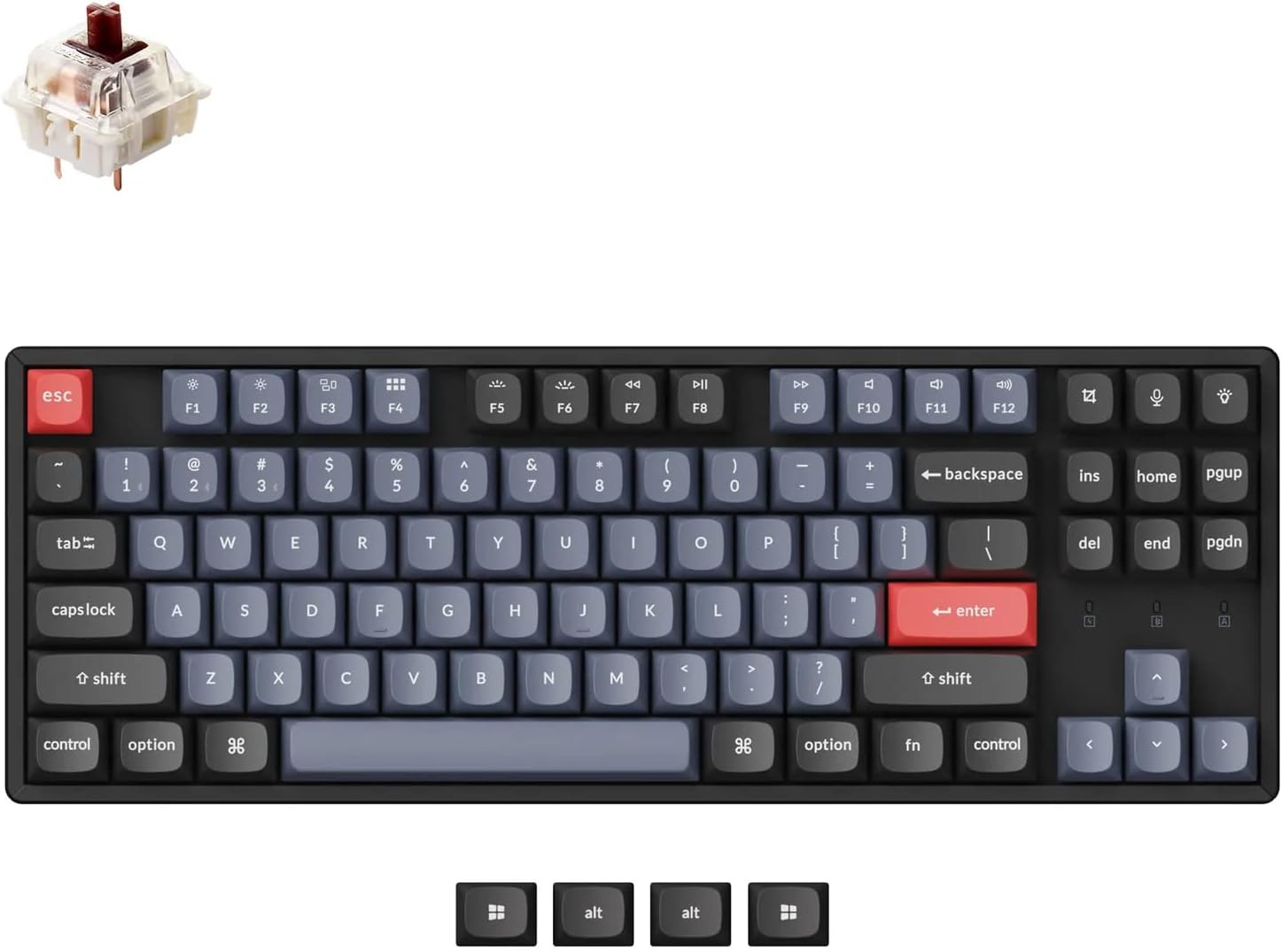
10. Keychron K2 Pro Wireless Mechanical Keyboard
The Keychron K2 Pro is 2026’s most talked-about keyboard for WFH setups. Hot-swappable switches, a compact 75% layout that keeps function keys, Bluetooth + USB-C dual mode, and Mac/Windows compatibility out of the box. Choose between red (linear), brown (tactile), or blue (clicky) switches to match your preference.
Pros
- Hot-swappable switches
- Bluetooth + wired mode
- Mac & Windows layout keys
- RGB backlight
Cons
- Clicky variants are loud
- No numpad
Category 7 – Desk Lighting
Proper lighting is one of the most overlooked elements of a productive WFH setup. It directly impacts eye strain, your mood, and how professional you appear on video calls.
11. BenQ ScreenBar Plus Monitor Light
The BenQ ScreenBar Plus clips directly onto your monitor and uses an asymmetric optical design to illuminate only your desk — no glare on screen. Its auto-dimming sensor and 2700K–6500K color temperature range keep your eyes comfortable from sunrise to midnight. The wireless desk controller is an underrated luxury. A WFH staple in 2026.

Pros
- No screen glare design
- Auto-dimming sensor
- Wireless dial controller
- USB-powered (no plug needed)
Cons
- Premium price
- May not fit curved monitors
Category 8 – Headsets & Microphones
Clear audio on calls is non-negotiable. A dedicated microphone makes you sound dramatically more professional than any built-in laptop mic — and your teammates will thank you.
12. Blue Yeti USB Microphone
The Blue Yeti remains Amazon’s top-selling USB microphone for WFH and content creation in 2026. Its tri-capsule array and four pickup pattern modes (cardioid, stereo, omnidirectional, bidirectional) make it incredibly versatile. Plug-and-play into any computer — no drivers needed — and the on-mic controls let you adjust gain and mute instantly.

Pros
- Studio-quality voice audio
- Plug-and-play USB
- 4 pickup patterns
- Headphone jack for monitoring
Cons
- Large desk footprint
- Picks up background noise
Category 9 – Docking Stations
A Thunderbolt or USB-C dock lets you connect your entire desk setup to your laptop with a single cable. One plug in = keyboard, mouse, monitors, webcam, ethernet — all live instantly. This is the upgrade that ties your whole setup together.
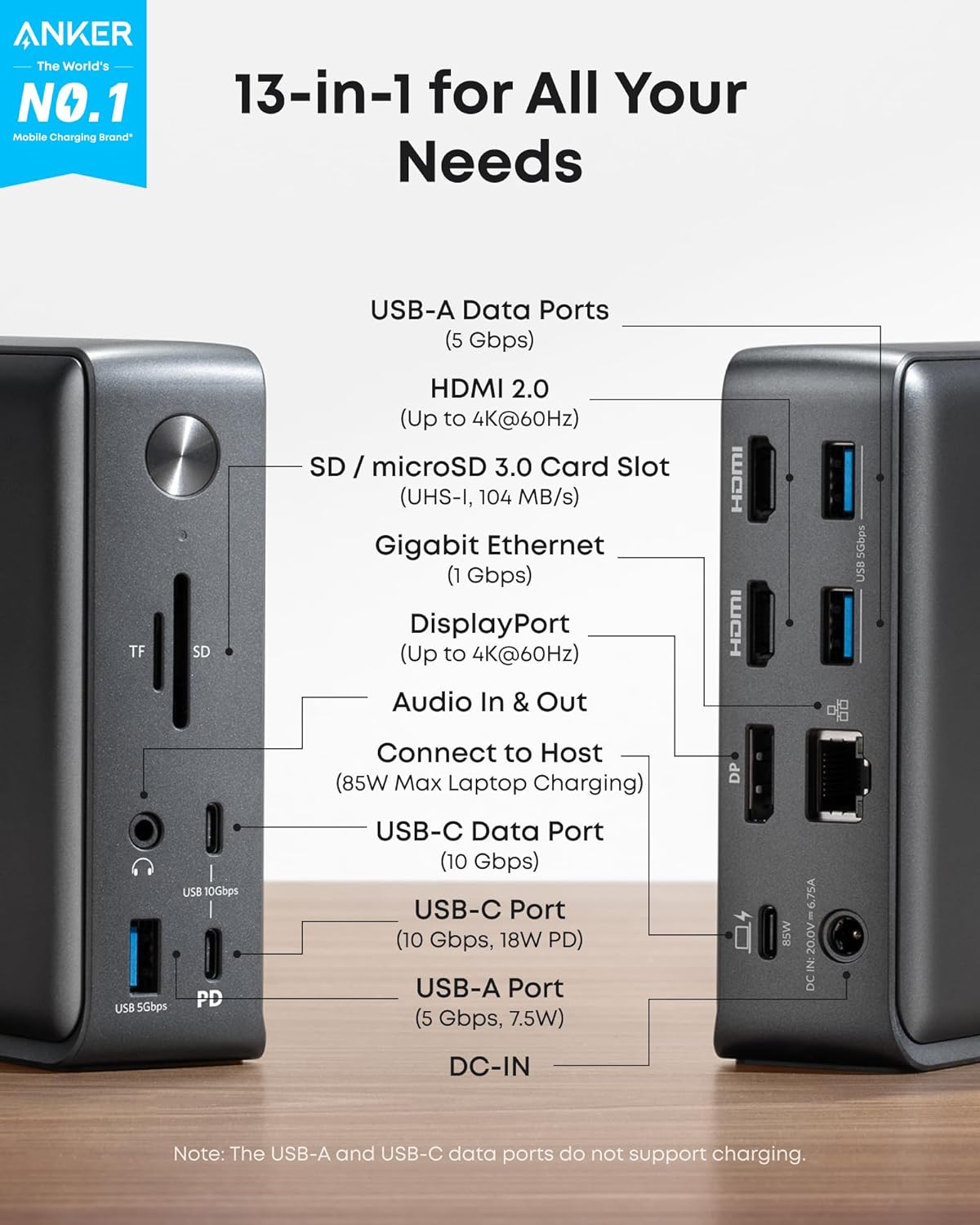
13. Anker 575 USB-C Docking Station (13-in-1)
The Anker 575 is the Amazon best-seller in docking stations for good reason: 13 ports including dual HDMI + DisplayPort, 85W laptop charging, USB-A 3.0, SD card, ethernet, and 3.5mm audio — all for well under $100. Works flawlessly with MacBook, Dell XPS, Surface, and most Windows laptops via USB-C.
Pros
- 13 ports — covers everything
- 85W laptop charging
- Dual display output
- Excellent price-to-port ratio
Cons
- Not Thunderbolt 4
- Runs warm under heavy use
How to Build Your Setup: A Budget Guide
Not everyone needs every item at once. Here’s how to prioritize by budget:
🟢 Under $300 — The Essential Starter
ErGear standing desk ($180) + ergonomic chair ($149) + a cable tray ($20). This foundation eliminates the #1 WFH complaint: back pain and desk mess.
🔴 $1,500+ — The Dream Desk
Herman Miller Aeron, Samsung ultrawide, Blue Yeti mic, Keychron keyboard, MX Master 3S mouse, Thunderbolt 4 dock, BenQ ScreenBar Plus. The setup everyone screenshots.
🟡 $300–$700 — The Productive Upgrade
Add a 4K monitor ($280–350), Ergotron LX arm ($140), Logitech Brio webcam ($100), and a BenQ ScreenBar ($60). Your video calls will look dramatically more professional.
🟠 $700–$1,500 — The Pro Setup
Swap in the Flexispot E7 Pro ($500), a proper ergonomic chair ($300+), ultrawide or dual 4K monitors, and a USB-C dock. You’re now at professional studio quality.
Final Thoughts
Building a great WFH setup in 2026 doesn’t have to happen all at once — but every upgrade you make compounds. A better chair reduces afternoon fatigue. A proper monitor means fewer headaches. A good webcam earns you credibility in meetings without saying a word.
Start with the ergonomics (chair + desk), then build toward the peripherals. All the products above are available on Amazon, ship fast, and have strong return policies — so you can test them risk-free.
Bookmark this page — we update it regularly as new products launch and prices change. And if you found this guide useful, consider sharing it with a remote-working friend who’s still squinting at a 13″ laptop on a kitchen table.
Related Posts
- From CPUs to NPUs: The Rise of AI-Powered Chipsets in Modern Laptops
- Top 10 Chrome Extensions That Will Boost Your Productivity
- OnePlus 13 Features: What You Need to Know
- Explore Top 10 AI Glasses for 2025: Features, Pricing, and Where to Buy